


MissLive - Voice & Chat Near
4.130.00 Reviews
App Specs
- Version
- 4.3.6
- Updated On
- License
- Free
- Downloads
- 1,000,000+
- Developer
- Insight-Innov
- Categories
- Lifestyle
- Platform
- Android
Screenshots

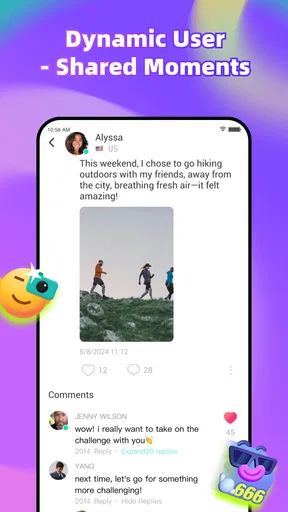
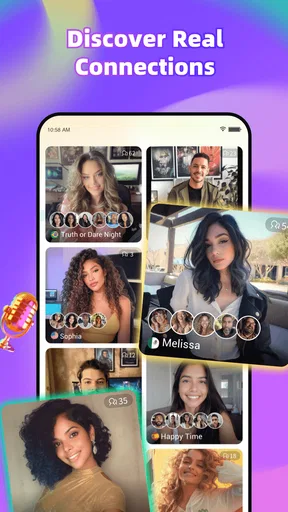

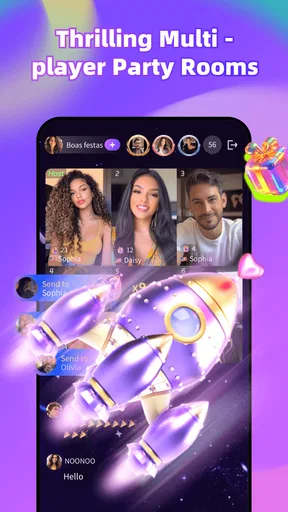

 Analysis by AppCompare
I approached MissLive - Voice & Chat Near as a social lifestyle app rather than another messaging tool. Its appeal is simple: it is built around meeting people through voice and chat, which can feel more immediate than typing into a quiet text-only network. After spending time with it, I think the main decision is not whether it is “better” than every alternative, but whether you want a more spontaneous, conversation-led way to socialize.
The app is free to install and use, and it comes from Insight-Innov. It has reached over one million installs and holds a 4.1 average from around six thousand ratings, so it is not an obscure experiment with no visible audience. At the same time, the mature 17+ age rating matters: I would not treat it as a general-purpose family chat app or hand it to a younger teenager without careful supervision.
My short version is this: MissLive makes the most sense for adults who enjoy low-pressure conversation and want something more personal than scrolling through posts. It is less convincing for people who want a tightly organized community, a professional networking tool, or a completely predictable social experience.
What I would consider before choosing it
I’d weigh the kind of routine I want before deciding whether to keep MissLive around: occasional conversations can be a welcome change, while constant checking may turn social discovery into another obligation. I also pay attention to whether I can leave an interaction feeling comfortable, rather than merely entertained. That balance matters over time, and it leads to the question of where the app earns its place in an ordinary day.
Start with the kind of social contact you actually want
Before installing any voice-and-chat app, I ask myself what I am trying to replace. If I want to send quick messages to people I already know, a conventional messenger is usually more practical. If I want public discussion around a hobby, a community platform is often easier to search and moderate. If I want a relaxed conversation with someone new, MissLive is closer to that third use case.
That distinction makes a real difference. The app is not most useful when I treat it like a contact book. Its value comes from the possibility of moving from a casual introduction to a more natural exchange. Voice can reveal tone and personality faster than text, but it also asks more from me: I need privacy, time, and a willingness to speak with someone I may not know well.
I would also consider how much control I want over discovery. Apps centered on meeting new people can be enjoyable when I am open to unexpected conversations, but they are not ideal when I need every interaction to be filtered by a detailed interest system. MissLive suits curiosity better than rigid planning.
Worth Reading Before You Choose

EA SPORTS FC Mobile 26 Is a Bigger Football Game, but It Takes Time

Flipboard Shows What News Apps Must Do Beyond the Feed

Switching to Android Auto Means Rethinking Your Driving Routine

Google Calendar Makes a Crowded Week Easier to Manage

Ludo King Makes the Most of the Minutes Between Plans

Baby Panda World Brings Quick Play to Modern Phones, but Its Game Library Feels Busy
Think about privacy before the first conversation
My practical advice is to decide in advance what I will and will not share. I would keep my full name, home address, workplace details, financial information, and private contact accounts out of early conversations. That is not a criticism unique to this app; it is simply the right habit for any service that connects strangers.
I would also begin with text when I feel uncertain, then move to voice only after the conversation seems respectful. Voice creates a stronger sense of familiarity, which can be pleasant but can also make trust develop faster than it should. A useful personal rule is to end a conversation immediately when someone pressures me to reveal information, send money, move elsewhere, or ignore a boundary.
Because the app carries a mature age classification, I would expect adult themes or adult-oriented interactions to be possible within its social environment. That makes the app a poor choice for children and a service that adults should approach with normal online-safety awareness. Blocking or reporting tools are important in this type of app, but I would not rely on any platform to remove every uncomfortable interaction before I encounter it.
Check whether the payment model suits your habits
The basic download is free, which lowers the barrier to trying it. However, in-app purchases range from twenty cents to nearly two hundred and fifty dollars per item. That is a wide span, and it is the kind of pricing structure that deserves attention before I tap a purchase button.
I would treat any paid element as optional until I understand exactly what it changes. My preferred workflow is to use the free experience first, decide whether the conversations are genuinely useful, and set a spending limit before exploring extras. A free app can become expensive if I make small impulse purchases repeatedly, especially when the social setting encourages quick decisions.
This is also where MissLive differs from a completely free messaging app. A conventional messenger may be less exciting for meeting strangers, but it is usually easier to understand financially. With MissLive, the trade-off is convenience and discovery on one side, and the need for stronger spending discipline on the other.
Where MissLive feels strongest in everyday use
For me, MissLive is at its best when I have a little time and genuine curiosity, but no need to arrange a call or publish to a broad audience. I’d treat each visit as a small social opportunity, not a promise of a lasting connection; that keeps expectations realistic and makes it easier to notice whether the experience is still worth returning to.
It makes voice feel like a starting point, not an afterthought
The strongest idea here is the combination of voice and chat. Text is useful for opening a conversation, asking a quick question, or deciding whether someone seems compatible. Voice can then make the exchange feel less formal. I found that this format is better suited to people who dislike composing long messages but still want more than a silent feed.
There is a useful middle ground between a public social network and a traditional phone call. A phone call usually assumes an existing relationship and a specific reason to connect. A public feed often rewards performance, short reactions, and visible popularity. A voice-and-chat service can feel more direct without requiring the same level of commitment as calling someone I already know.
That does not mean every conversation will be meaningful. The app cannot manufacture chemistry, and a voice option does not automatically make a stranger trustworthy or interesting. What it does is reduce one layer of distance. For the right user, that is enough to make social discovery feel more human.
A realistic evening scenario
Imagine I have finished work, do not want another video-heavy social network, and would like a short conversation without arranging it days ahead. I could open MissLive, look for a suitable interaction, begin with a few text messages, and decide whether a voice exchange feels comfortable. If the conversation becomes awkward, I can leave instead of being tied to a scheduled call.
That scenario shows both the strength and the weakness. The low commitment is attractive when I have only a little free time. But because the interaction is spontaneous, I should not expect the depth or reliability of a close friendship immediately. I would use it as a way to widen my social routine, not as a replacement for people I already trust.
It can help quieter users take a smaller first step
I think the app may work particularly well for someone who finds large public communities intimidating. A text-first opening gives me time to think, while voice offers a more personal option when I am ready. That progression is more comfortable than being pushed directly into a crowded live room or a public comment thread.
There is a subtle advantage in treating the first exchange as a test rather than a commitment. I can pay attention to whether the other person listens, respects pauses, and responds to what I actually say. Those signals are more informative than a polished profile alone. My tip is to keep the first conversation short enough that leaving never feels like a dramatic decision.
The version and audience suggest an active product, but not a guarantee
The current version is 4.3.6, and the app’s install reach suggests that users can expect a living service rather than a one-time download. That is encouraging for a social app, because an empty network is one of the fastest ways for this category to fail.
Still, install totals do not tell me whether I will find the right people at the exact time I open the app. Social usefulness depends on who is available, how conversations are handled, and whether the audience matches my interests. I would judge it after several sessions at different times, not after one quiet visit.
Small habits make the experience more manageable
I would use a simple three-stage routine. First, I would browse with a specific intention instead of opening the app whenever I feel bored. Second, I would start with brief text and avoid giving away personal details. Third, I would move to voice only when the exchange feels mutual and respectful.
Another useful habit is to separate “interesting” from “urgent.” A person may seem engaging without deserving immediate access to my private life. I would also avoid making purchases during an emotionally exciting conversation. Waiting until the next day is an easy way to tell whether an optional feature still feels worthwhile.
Finally, I would keep notifications under control if the app allows that choice on my device. Social apps can quietly turn spare moments into constant checking. MissLive is more enjoyable when I choose when to participate rather than letting every alert dictate my attention.
What may create friction
The biggest limitation is built into the concept: meeting new people requires patience. Some interactions will be brief, mismatched, or repetitive. If I want a carefully curated learning community or a dependable group around one hobby, a dedicated platform will probably give me better results.
Voice also raises the social pressure. A text conversation can be paused while I think. Speaking requires more immediate attention, and not everyone is comfortable with that. People who dislike spontaneous interaction may find the app tiring rather than liberating.
The mature rating and broad purchase range add another layer of caution. I would not recommend it to anyone who is uncomfortable managing adult social spaces or setting firm financial boundaries. Free entry is helpful, but it should not be confused with a guarantee that every part of the experience will remain cost-free.
How it compares with the usual alternatives
Compared with ordinary messaging apps, MissLive is more oriented toward meeting and talking with people beyond an existing contact list. A normal messenger wins when reliability, familiar contacts, and straightforward communication matter most. I would choose that alternative for family, work, appointments, and sensitive personal conversations.
Compared with public social networks, MissLive feels more conversation-focused and less dependent on posting for an audience. A feed-based service is better when I want news, visual updates, public reactions, or an ongoing record of interests. MissLive is a better fit when I care more about an exchange than about publishing something for many people to see.
Compared with large community platforms, it may feel less structured around topics and long-term groups. A hobby forum or organized community is the stronger option when I want searchable advice, shared resources, and repeated contact with the same interest-based audience. MissLive has the advantage when I want a more personal beginning and do not already know which community to join.
Compared with live-streaming services, it offers a more direct conversational idea rather than a performer-and-audience relationship. Streaming is preferable when I want entertainment or a creator to follow. I would look at MissLive when participation and two-way interaction are more important than watching.
Who should try it, and who should skip it?
I would recommend trying it if you are an adult who enjoys meeting unfamiliar people, prefers voice to long typing sessions, and can handle conversations that may not lead anywhere. It is also worth considering if public feeds feel superficial but a formal phone call feels too intense.
I would skip it if your main goal is secure communication with existing contacts, professional networking, structured education, or a tightly moderated interest group. I would also avoid it if you are likely to spend impulsively on social features or feel pressured by rapid personal conversations.
For parents, the mature classification is the decisive point. I would not present this as a children’s social app. For adults who are new to this category, I would begin slowly, keep conversations inside the app until trust is earned, and leave at the first sign of manipulation or disrespect.
The real cost of switching
Moving from a familiar app to MissLive is not mainly a technical change; it is a change in social expectations. On a standard messenger, I already know who I am contacting. Here, I may need to spend time learning how to identify worthwhile conversations, handle mismatches, and protect my attention.
That learning curve is the hidden cost of switching. I would need to rebuild a routine, discover which interactions suit me, and decide whether optional purchases add enough value. The free starting point makes experimentation easier, but my time and emotional energy still count as costs.
There is also a switching benefit: I do not have to abandon every other service. I can use MissLive for spontaneous social discovery while keeping a conventional messenger for people I know and a community platform for focused interests. In my view, it works best as a complementary app rather than a universal replacement.
My recommendation
After weighing the alternatives, I see MissLive as a focused choice for adult social discovery, not an all-purpose communication app. Its voice-and-chat format gives conversations more immediacy than a typical feed, while the text option provides a gentler way to begin. That combination is the reason I would suggest trying it to a friend who wants more human interaction but does not want to commit to scheduled calls or crowded public groups.
I would install it with modest expectations, use the free experience first, and establish privacy and spending boundaries before becoming deeply involved. I would also give it more than one session, because the quality of a social network depends on timing and audience fit.
Insight-Innov has made something that can be appealing when I want an unplanned conversation and am willing to take responsibility for how I participate. The mature 17+ positioning, optional purchases, and unpredictable nature of meeting strangers mean it is not for everyone. If you value spontaneous adult conversation and approach it with patience, boundaries, and a clear budget, MissLive is worth a careful try; if you need structure, certainty, or communication with people you already know, a conventional alternative will serve you better.
Pros
- Easy-to-use interface for discovering nearby voice and chat rooms.
- Voice conversations feel more immediate and personal than text-only messaging.
- Useful filters help users find people or rooms matching their interests.
- New users can quickly join conversations without a complicated setup.
- Regular social activity can make the app feel lively and engaging.
Cons
- Some rooms may have uneven conversation quality or limited activity.
- Voice chat can use significant mobile data
- especially on cellular networks.
- Privacy settings should be checked carefully before sharing personal details.
- Interactions may depend heavily on the number of active users nearby.
- In-app purchases may be needed for certain premium social features.
FAQs for MissLive - Voice & Chat Near
What is MissLive - Voice & Chat Near, and how does it work?
MissLive - Voice & Chat Near is a social communication app designed for meeting people, joining voice conversations, and chatting with users nearby or from different locations. After creating a profile, you can browse available users, start text or voice interactions, and decide who you want to connect with. Features and user availability may vary depending on your region and account settings.
Is MissLive - Voice & Chat Near free to download and use?
The app can generally be downloaded at no initial cost, but some functions may require in-app purchases, virtual coins, subscriptions, or other paid options. Free users may have access to basic browsing and communication features, while premium tools can improve interaction limits or visibility. Before spending money, review the current pricing, renewal terms, and purchase conditions shown in the app store.
Is MissLive safe for meeting and chatting with strangers?
MissLive includes the usual risks associated with social and live-chat platforms because conversations involve people you may not know personally. Avoid sharing your address, financial information, passwords, private documents, or intimate content. Use blocking and reporting tools when necessary, and be cautious of users requesting money or trying to move conversations to unfamiliar websites. Younger users should follow the app’s age requirements and parental guidance.
Does MissLive require a camera, microphone, or location permission?
The app’s main communication features may request access to your microphone for voice conversations, while other permissions can depend on the tools you choose to use. Location access may be requested to show nearby users or personalize discovery, but you should check whether it can be limited to approximate or while-using access. Grant only permissions that are necessary and review them regularly in your phone settings.
Can I delete my MissLive account and control my privacy?
You should be able to manage important privacy options through the application settings or the account-support process, including profile visibility, notifications, blocked users, and permissions. If you decide to stop using the service, look for an account deletion option rather than simply uninstalling the app, since removing the app does not necessarily erase your profile or stored data. Check the latest privacy policy for retention and deletion details.


